Unit 2: Computer Search Strategies
ENG101: Information Literacy
Unit 2 - Computer Searching Strategies
After Completing this unit, you will:
- be able to select keywords to use in a computer based search.
- be able to use Boolean Searching to narrow the focus of a search.
- be able to search for a specific phrase or string of keywords using quotation marks .
ENG101: Information Literacy
Unit 2 - Computer Searching Strategies
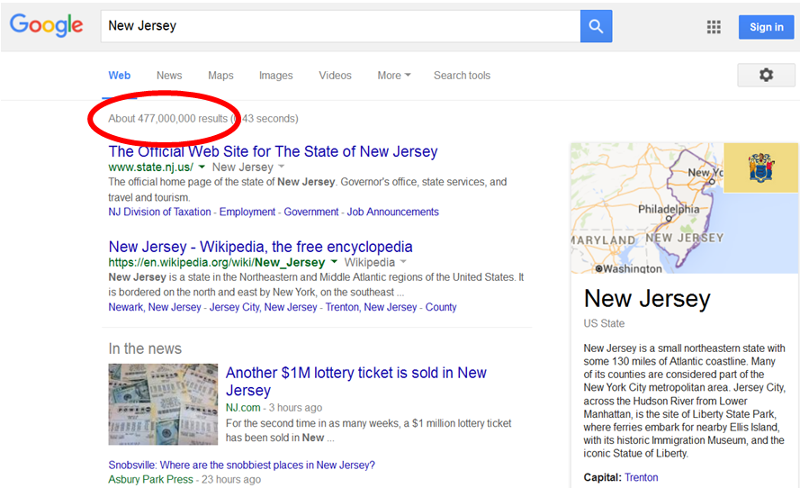
- Have you ever noticed how many search results or hits you go when searching Google?
-Your results can easily be in the millions!
-Take a look at the Google search for New Jersey below. This search gave us about 477 million results!
ENG101: Information Literacy
Unit 2 - Computer Searching Strategies
When you perform a computer search, the computer only matches the letters you give it, not the word itself.
For example, say you search for the term "Trenton". The computer will match anything that contains the letters t-r-e-n-t-o-n in that order.
The computer does not know the meaning of the word(s) you use.
The words you use for a search are called Keywords
The first step to an effective search is to think about the words that describe or would commonly be used when discussing your topic. It might help to write these words down.
ENG101: Information Literacy
Unit 2 - Computer Searching Strategies
Once you have thought about your keywords, you can manipulate them to have a more effective search
- Boolean Searching/Boolean Logic [both terms might be used]
- With Boolean searching, you connect your keywords with the words and, not, or or (known as Boolean operators) to better define your search.
- For example:
- dogs not poodles
- car or automobile
- black and white
- Use quotation marks " " to lock a phrase or string of word together
- For example:
- "survival of the fittest"
- "United States of America"
- "Bill Gates"
- NOTE: Use quotation marks in your searching judiciously, just for important key terms/phrases. Using quotation marks around your research question or another sentence will not yield many (if any) results as you are asking the search tool to find a specific sentence, exactly word for word.
In the next unit, find out how to access the MCCC Library's databases to find articles